
Data Warehouse Automation in a Microsoft Environment
With AnalyticsCreator you can create a Data Warehouse in a Microsoft environment completely automatically.

Complete Automatic Generation
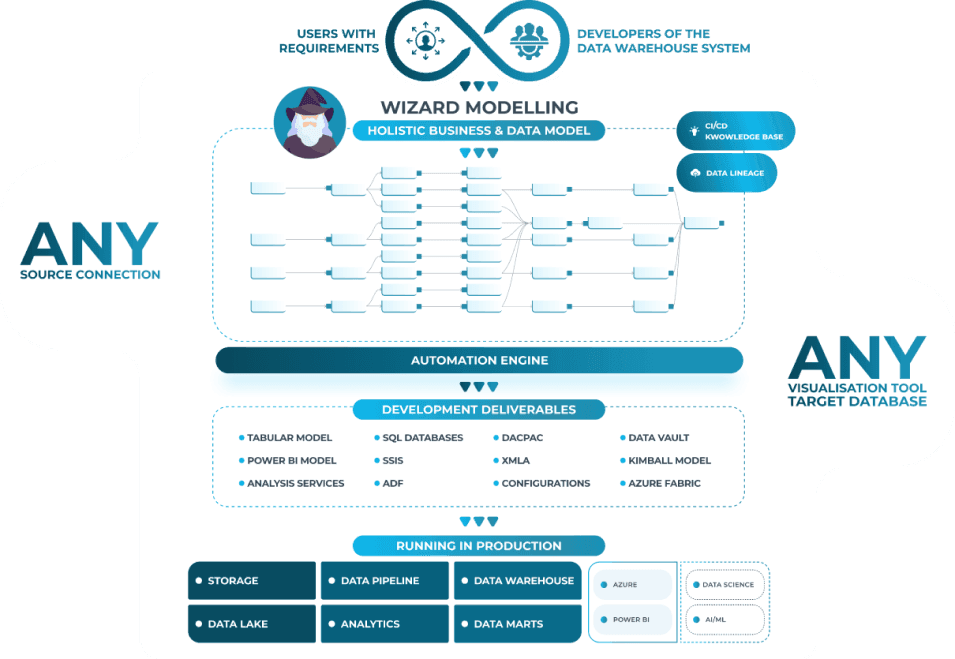
The software creates databases in the development environment, including all the elements needed to contain, display, and manipulate data (tables, logical views, stored procedures). AnalyticsCreator also generates all the ETLs needed to acquire data from sources, transform it, and insert it into the DWH, such as SQL Server Integration Services projects.
During deployment, AnalyticsCreator generates the Data Warehouse database release package, the SSIS project installation package, and, optionally, the XMLA scripts to create OLAP and/or Tabular cubes.
What it generates automatically
AnalyticsCreator automates the creation of all the necessary components for your Data Warehouse.

Main features
A complete platform for data management and automation

Data Warehouse Automation
It simplifies the creation and maintenance of a DWH through pre-built components and unified data model management. It automates data extraction, transformation, and loading (ETL), supporting sources such as MS SQL Server, SAP, Oracle, and Salesforce.

Flexibility in modeling
It supports multiple data modeling approaches, such as Kimball and Data Vault, giving users the ability to choose the method that best suits their needs.

Data historicization
Data historization is managed in a highly automated manner, offering various ways to archive and track data changes over time. It allows you to manage data snapshots to compare values at specific intervals.

Governance and compliance
Ensures data integrity and compliance with security, protection, and auditing features. Automated documentation keeps all processes transparent for all stakeholders.

Low-code interface
It offers an interface that simplifies the management of the entire data pipeline, making it accessible to both technical experts and non-experts.

Integration with BI tools
It integrates with Business Intelligence tools like Power BI, Tableau, and Qlik, enabling rapid deployment and code generation for analytics and visualizations.
Technical Architecture
A complete overview of the AnalyticsCreator workflow